Numa X Piano GTseNuma X Piano GTNuma X Piano 88Numa X Piano 73
Firmware 3.0## Update procedure
1. Download and install **Numa Manager**
(Numa X Piano GTse requires version 1.7.0).
Get Numa Manager
2. Download the firmware.
Numa X Piano Firmware 3.0.2
3. Turn on Numa X Piano while keeping pressed up the **Main Encoder**.
The display will show the message "*FIRMWARE UPDATE MODE*".
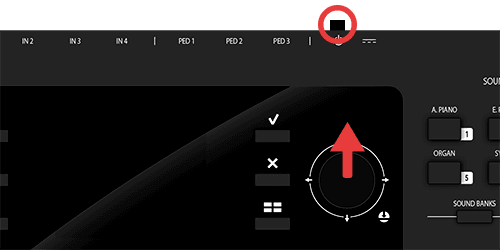
4. Connect Numa X Piano to your computer with a USB cable.
5. Open Numa Manager and click ***Firmware update*** (if Numa X Piano is in Update Mode, it will directly enter in Firmware Update section).
6. The upgrade will take longer than usual. Please wait.
If you are using a battery-powered laptop, make sure it does not go to sleep/standby.
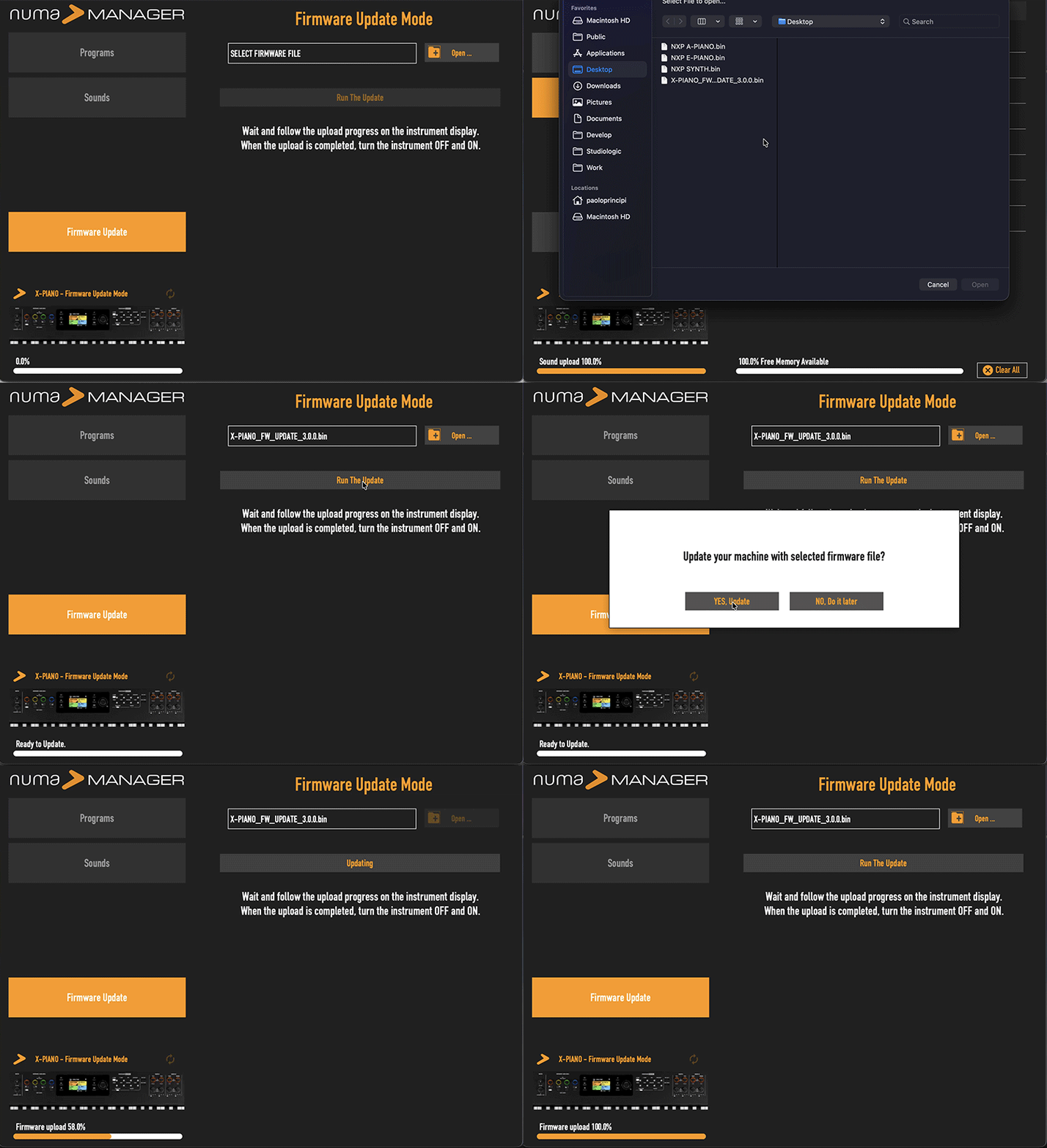
8. Reboot Numa X Piano.
## Factory Sound Banks Upgrade
**If you have a numa X PIano GTse version, skip steps 1-3!**
1. To take full advantage of all the features of the new 3.0 firmware, load the new factory sound banks: Acoustic Piano, Electric Piano, and Synth.
Factory Sound Banks 3.0
2. Open the Numa Manager, click on "Sound" button and load the first sound bank: "NXP A-PIANO.bin".
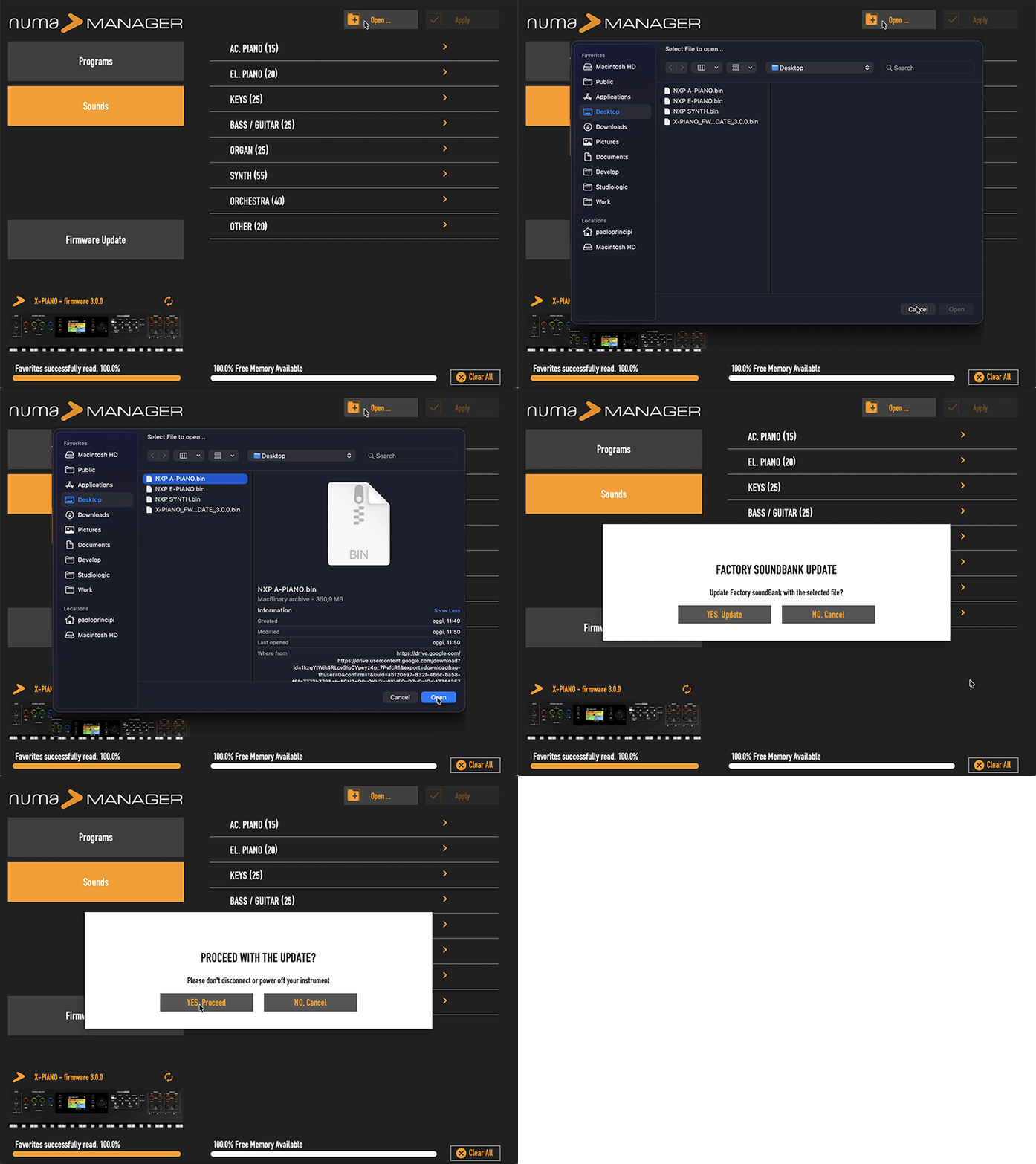
3. Do the same with the other sound banks: "NXP E-PIANO.bin" and "NXP SYNTH.bin".
4. Once finished, make a Factory Restore to update the Factory Programs with the Sounds, Fx and Parameters. Before restoring, save your Programs on the Manager in case you want to keep them in a file or transfer them with the Manager.
5. New programs include the "Stage D", our flagship piano sound.
If you haven't installed it yet, download it here:
Stage D
6. If you've already downloaded some of our user Piano sounds, please downlaod them again, as they've been updated to work with new firmware.
7. Programs made with previous Firmware might need to re-select Synth sounds and edit the new parameters, then storing the Program accordingly;
## Release notes
### 3.0.2
- Optimized encoder operation during program change
- Minor bugs fixed
### 3.0.1
- Minor bugs fixed
### 3.0.0
Sound Engine:
- New STACCATO parameter for Acoustic Modeling sounds (Acoustic Pianos)
- Electric Modeling (electric pianos) models re-desined: Mark I, Mark II, Suitecase
- 2 new Wurly models: 200A, 200B
- New graphic interface for the Electric Modeling
- Brand new Synth Engine with new parameters in ZOOM mode (filter cutoff, resonance, amp and filter envelops, LFO, glide, mono, legato and velocity)
- New graphic interface for the Synth Engine
Effects
- 3 new Amp Simulation effects: JCM, TWIN, COMBO
- 2 new chorus algorythms: Chorus1, Chorus2
- New phaser algorythm: Phaser 90.
- 2 new modulation effects: SYMPHONIC e CHORALE.
- New LFO WAH effects.
Panel:
- 100 Programs have been re-programmed according to new 3.0.0 firmware features
- Firmware 3.0.0 recognizes XPiano GTse model (it requires version 3 and above).